Author: Stephan

About Stephan

I'm a self-employed software tester. I test and write software, listen to music and go hiking — sometimes simultaneously. Prior to this was a physicist and oceanographer, among other things.

Word of The Year 2013

The general idea of the “word of the year” isn’t particularly new: It seems to be popular in many languages and countries, according to the English Wikipedia, the German Wikipedia entry (other languages at the time of this writing are: Česky, Dansk, Esperanto, Français and Nederlands).

However, I got the idea to pick a personal word of the year from my wife. This idea goes at least back to a blog post by Ali Edwards. The notion (as I understand it) is to pick one word to guide you thought that year. To me this is an interesting change to the more traditional new years resolutions, since it conveys the idea of having a guidance, or vision rather than setting (usually) unreachable high aims.

It seems to me that a personal word of the year helps to move into a chosen direction. In a way it’s very much like a good vision for Scrum (and other!) software development teams — vision condensed into a single word. For all your small and bigger assignments you can quickly check, if what you’re attempting matches the idea of your chosen word, and then consciously decide if or how to proceed.

My word of the year 2013 is:

Explore
My word of the year 2013: Explore

Do you pick a word of the year for 2013? Which one?

Uses of Twitter

This post appeared fist at http://zenandtheartofautomatedtesting.eu/ on 18. Feb. 2012.
Since I’ll take that site down, I relocate it.

Uses of Twitter

First of all: Why discuss ways to use Twitter as a tester?

Well, almost all software is used in ways not anticipated by its creators. There are a lot of possibilities for a user to interact with the software — not caring about the system creators intentions.

And this is something a tester should practice: Find new ways to use given things.

I learned about a few more uses of Twitter at the conference and thus suggested the topic “How do you use Twitter (or other social networks)” for the Open Space session at the Agile Testing Days 2011 in Potsdam.

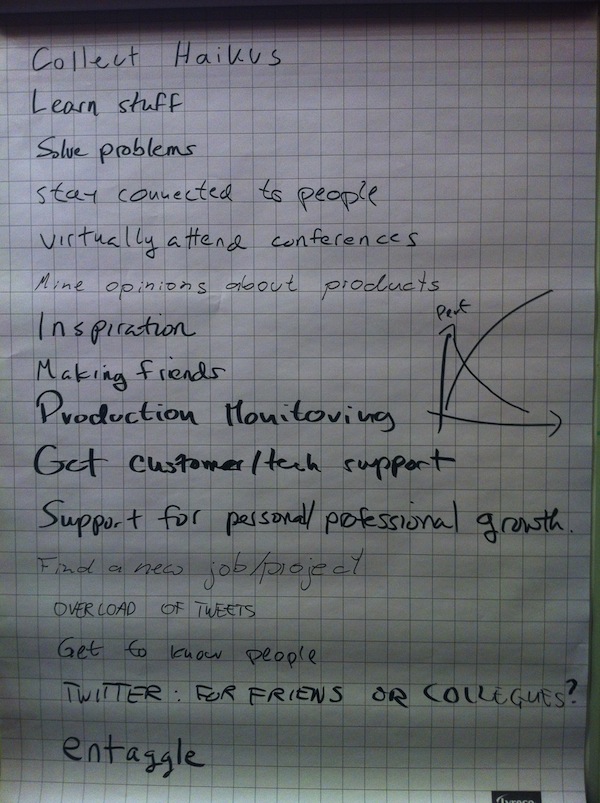
Thankfully enough people were interested in this, so here’s the result of this session in just one shot:

open_space_photo

In the following sections I’ll comment on the items in the same order as we collected them on the flip chart.

Uses of Twitter

  1. Collect Haikus

    For a start I put up this one, still impressed by Liz Keogh’s Keynote about Hypnosis & Haikus.

    To generalise, I think Twitter can be used to share & collect about everything — given an account or hash tag to group it in some way.

  2. “Learn stuff” & “Solve problems”

    This one boils down to ask a question using relevant hash tags (e.g. #Ruby, #testing, #quality) and getting help quickly. At other times you get very interesting input you didn’t knew you needed before actually getting it.

  3. “Stay connected to people”

    In my opinion staying connected to people I met/meet at conferences (or local gatherings) is extremely valuable. According to Neal Ford’s article Twitter Matters: Keeping Up with Weak Social Links, closely related people (family, friends or colleagues we see every day) often have the same information sources as we do, so their information isn’t new to us, while people we don’t know at all, tend not to share enough common interests, so their information isn’t as relevant to us. However, people we don’t meet too often (say once a year) have the most relevant and new (for us) information to share.

  4. “Virtually attend conferences”

    I haven’t done this (yet), but I imagine it to be fun. One of these conferences is the “ALE Bathtub Conf”, which you can attend in the bathtub, because no one would notice. See Bathtub Conferences

  5. “Mine opinions about products”

    This is an interesting one I hadn’t thought of before, but was immediately obvious when explained: Search tweets about a product and attributes people typically use when tweeting about it: #great, #FTW, #fantastic, but also #FAIL, #WTF, #isitjustme.

  6. “Inspiration”

    Read what others think about a topic and follow shared links… This can yield entirely unexpected results/connections between topics.

  7. “Making friends”

    Sometimes the Good Thing ‘just’ happens. An example Lisa Crispin shared with us: She tweeted about being stuck at home without a plan for the weekend (since the original plan to go to a conference in London fell victim to the Ejafjällajökull eruption in 2010). She read a tweet by someone from England who could not fly home due to the volcano, tweeting from a bookstore in Denver, CO. Result: They met, did some sightseeing and became friends.

  8. “Production monitoring”

    Someone mentioned they’d monitor performance of their web application, by monitoring the tweet rate about certain words (I assume company-name, #slow, #down could be a start…) The more tweets (per time unit) they’d see, the slower the web application would perform.

    To me, that’s fascinating, even though it’s more a (very good) heuristic, rather than a definite measure: Your users might come from a single time zone, so a performance drop during the night isn’t noticed immediately, or there is a problem — but no increase in the number of tweets because of another significant issue, e.g. a network outage in the wider area.

  9. “Get customer/tech support”

    Some companies are very good at listening to tweets about their product, and answer with helpful tips and/or explanations.

  10. “Support for personal/professional growth”

    This seems to be similar to “Learn stuff” & “Solve problems”.

  11. “Find a new job/project”

    This happened to me: After the end of a recent project I tweeted about my availability, got contacted, had a short interview and found a great new project. Excellent!

  12. “Overload of tweets”

    Obviously this entry isn’t a use of twitter, but rather a (possible) problem: There are only so many tweets you can read per day. Tweeting about almost everything in your life might result in people unfollowing you.

  13. “Get to know people”

    By following people, you get to know (a certain aspect of) them: How/What they think about a topic, how they react, whether they’re looking for someone to join for dinner at a conference.

  14. “Twitter: For friends or colleagues”

    We also briefly discussed the use of different accounts for different purposes or groups of people: friends, colleagues, profession, (programming) languages… Depending on the number of tweets about a certain topic it can be worthwhile to create an account for it: This way you can filter out (or focus on) this particular topic.

  15. “Entaggle”

    This last but not least entry is about the “other social networks” part of the sessions title. Entaggle was created by Elizabeth Hendrickson after a discussion about the value and sense (or lack thereof) of certificates for developers in general and testers in particular. On Entaggle you’d create a profile, be tagged and tag others using tags you (or others) create. That way a network of trust/respect is created.

    The reasoning behind this: People seem to trust the opinion of a real (and probably well-known) person more than an anonymous certification handed out by some institution or company. Opinions of real people matter, especially if you can get in touch with these people and ask for more information (or reasons for a tag they used).

If you’re using Twitter in yet another way, I’d like to hear about it.

At the Agile Testing Days 2010: Alternatives to Certifications, Part 2

This post appeared fist at http://zenandtheartofautomatedtesting.eu/ on 18. Oct. 2010.
Since I’ll take that site down, I relocate it.

At the Agile Testing Days: Alternatives to Certifications, Part 2

In At the Agile Testing Days: Alternatives to Certifications I explained my view on some of the possibilities that were discussed at in a session of the “Open Space” at the Agile Testing Days. (Also see Elisabeth Hendrickson’s summary of this session).
This time I’ll list and comment the other mentioned ideas.

One of the question we’re dealing with is still: What are ways to demonstrate your testing knowledge other than certificates? As in the previous post I’ll discuss suggestions made in this session.

“Create a Portfolio of Work”

The idea is to demonstrate you care about your craft and demonstrate your work. However you’re likely limited in what you are allowed to report: As far as defect reports are concerned many companies will not allow to publish lists of defects you found.
To work around this, how about Participation in open source projects as mentioned in the previous post? This information can be shared.

Stack Overflow

Stack Overflow is “a collaboratively edited question and answer site for programmers – regardless of platform or language. It’s 100% free, no registration required.”1. Read the About on the site.

Like participating in Open Source projects, Stack Overflow allows you to demonstrate problem solving (and finding) skills. A drawback I see, is the level of detail in the questions as well as the answers. Even though users rate each other, thus creating some level of reputation, it can be too hard to understand for non-technical people as hiring managers and project agents.

BBST Course through AST

Black Box Software Testing (BBST) is a four weeks (approx. 12 hours per week) course offered by the Association for Software Testing.
Compared to the 4 days for the training and exam of the ISTQB foundation, the course offers a greater technical depth and more practical work.

We Vouch For

We vouch for is expired at the time of this writing, see this tweet by Brian Marick. It was meant to, well, vouch for others. In case you like to resurrect it, here’s “Brian Marick’s “:http://twitter.com/marick tweet about where to find the source code.

Social Networks like Linked In, Xing

These social networks which are targeted at business anyway can help finding a new contract or job. Both of them allow users to accept (or ignore) requests to connect to another user, creating (sub) networks of users who trust each other2.

Other ideas mentioned

“Degrees” were also mentioned in this session. Since I don’t know whether this is about a specific (university) degree in testing or testing as a main sub topic in, say, computer science or software engineering, so I can’t elaborate about this.

The “Miagi-Do School of Testing” was also mentioned and Markus Gärtner (@mgaertne on Twitter) referred to it in his presentation at the Agile Testing Days. Since there’s no “official web site” for Miagi-Do, finding the place is part of the challenge3.

“Create Open Source Online Courses for ISTQB” ins’t actually suggesting an alternative to the ISTQB certification — however, it was mentioned in the brainstorming. Providing open source (or creative commons) material and courses requires some funding, though.

“Testipedia” was another topic noted on the stickies, yet little is easily found on the web (apart from, well testipedia, but that probably wasn’t the subject).


1 Citing stackoverflow.com

2 …enough to link their profiles to each other. Whether or not this measures a level of trust reasonably or even indicates the experience or knowledge in a certain field is another question.

3 according to a black-belt Miagi-Do tester.

At the Agile Testing Days 2010: Alternatives to Certifications / Part 1

This post appeared fist at http://zenandtheartofautomatedtesting.eu/ on 10. Oct. 2010.
Since I’ll take down that site, the article is relocated.

At the Agile Testing Days: Alternatives to Certifications

A session of the Open Space Day (facilitated by Brett L. Schuchert) at the Agile Testing Days dealt with alternatives to certifications. Elisabeth Hendrickson tweeted a link to the summary of this session already.

Apart from answering the question “What is the value of certifications?” and “Do we need something other than certificated at all?” (neither of which I’ll discuss here), there’s one important question: What are ways to demonstrate your testing knowledge other than certificates?

That’s what this article is about.

I’ll elaborate on some of the alternatives we discussed. Some of them here were brought up by me, others were not. So, if you disagree on a topic you’ve brought up, please let me know1.

Novice – Apprentice – Journeyman – Master

I like the idea of learning from practitioners who have a better understanding and deeper experience in the field I like to learn about. This is a central idea of Software Craftmanship. The idea here is that at each stage you’d learn (mostly) from others one stage ahead of you. This enhances almost everyone in learning by teaching, certainly a very powerful way to learn and internalise material you’ve just learned yourself.

Find someone who’s willing to help you to learn about the topic you chose and who’s experienced.

Note, this is not as much about finding someone to actually teach you2, but help you teach yourself.

Participation in open source projects (as testers)

There are lots of open source projects out there. Whether it’s automated regression checks (or tests, in case you don’t follow Michael Bolton’s terminology) exhaustive exploratory testing or other ways of testing (or checking): You’re probably using some open source software already, and improving this software by providing your testing feedback is a Good Thing.

You help to develop software you’re using, making your own life better3 and you demonstrate your testing practice.

Twitter

By following other testers on Twitter (and may be the #testing hashtag, too) and joining the discussion is another way. Even by ‘just’ following others and reading the linked to blog articles alone I learned a lot. However, joining the discussion at your pace4 will give result in a significantly richer learning experience.


1 Of course I wouldn’t mind hearing about your agreement as well. And in case you do agree; I’d like to hear from you, too.

2 Experienced practitioners happen to be usually rather busy. However they’re also happy to help you to help yourself.

3 Also known as “Eating your own dog food”

4 Some tweet at a remarkably high frequency, that’s not easy to follow at times. Don’t panic.

Agile Testing Days 2012 — YAS (Yet Another Summary)

Just like the years before I enjoyed the Agile Testing Days a lot. A fun theme throughout many of the talks were… unicorns and I think Gojko Adzic started it. This affected my brain so much, I said ‘Look, a unicorn!’ to my dog, when I took him for a walk for the first time after I came back from the conference. Actually, the animal crossing our path was a squirrel.

Here’s a short summary of my favourite parts. In order to stay in sync. with the printed & online conference program I’ll start counting the conference days at 0.

Day 0 – Tutorial “Software Testing Reloaded” with Matt Heusser & Pete Walen

Just as the full title “Software Testing Reloaded – So you wanna actually DO something? We’ve got just the workshop for you. Now with even less PowerPoint!” promised, there was only very little PowerPoint and a whole lot of testing & questioning.

I especially liked the way Pete & Matt presented the examples & exercises as well as the reasoning behind them.

Electronic Dice
Electronic Dice

There were a lot of games and actual testing. All was very hands on, well explained and debriefed at the end. To give just one example: We tested electronic dice, in order to give an estimation about how long testing would take and to come up with a recommendation whether these dice were ready to be used.

Questions like “Can we ship it now?”, “Is there a pattern/problem there?” and “What actually are the requirements?” were covered.

I also won a price, so my point of view might be biased. 😉

How to Reduce the Cost of Software Testing

Day 1

  • Get them in(volved) by Arie van Bennekum
    I found it super interesting to listen to one of the creators of the Agile Manifesto, especially since he pointed out that many of the principles and values have been around before the manifesto was written.
  • Myths About Agile Testing, De-Bunked by Janet Gregory & Lisa Crispin
    Lisa & Janet debunked myths as ‘Testing is dead’, ‘Testers must be able to code’ and ‘Agile = Faster’. Excellent story and fun presentation.
  • Consensus Talks – 7 10-minute-talks (including mine)
    The format of 10-minute talks, all back-to-back and no break included was the one I missed in the previous Agile Testing Days. This way a whole lot of ground is covered in a short time and it’s a great opportunity to explore new techniques in presenting without doing too much harm and/or presenting on conferences for the first time.
  • Self Coaching by Lasse Koskela
    Lasse explained how to coach yourself. After explaining how the human brain works he talked about how to step ‘out of the box’ (your personal point of view) in order to better understand what others actually say and to stay honest to yourself at the same time. Deep knowledge, very well explained indeed.
  • The MIATPP Award Night 2012
    Lisa Crispin won the MIATPP Award. Congratulations!

Day 2

  • Test Lab by James Lyndsay & Bart Knaack
    This year I went to the “Test Lab” and tested a small LEGO Mindstorm robot, that could move around on a coloured sheet of paper and react, depending which colour its camera would detect. The task: Find out what the specification of the robot is and find defects in its implementation.
    Very interesting: We had to come up with a hypothesis of how the robot was supposed to work as well as finding defects. I really enjoyed the way Bart & James gave feedback and asked the right questions.
  • “Reinventing software quality” – Gojko Adzic
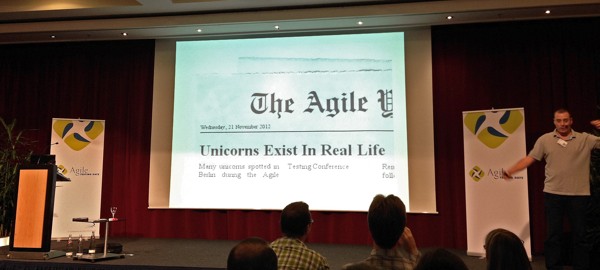
    Breaking News: Unicorns Exist

    Gojko made the point that in agile testing we might (still) not focus on the right thing: To build the right software. Instead we concentrate on finding bugs and building the software in the right way. He illustrated this with one of his books:  He found a defect and then spent a while searching & listing more problems and ended up with a good number of them, definitely enough to make you worry about the quality of the book. However, the publisher explained that essentially all reviews were very positive! So: When people keep paying for your product or service, worrying about defects may not be that important.

Day 3

  • “Fast Feedback Teams” – Ola Ellnestam
    explained the importance and value of fast feedback. And he’s right: In many projects feedback could be gathered a lot earlier and be used to improve what features are built (as well as how they’re built). Other talks at least touched this topic as well. And while I wholeheartedly agree about this, I’m also a bit worried that we (as software creators) might forget about (or even ignore) slow changing aspects (for more about this see my previous post ‘Slow Feedback Cycles‘).
  • “Exceptions, Assumptions and Ambiguity: Finding the truth behind the Story” by David Evans
    UK Explained

    David explained how natural language is ambiguous, unclear and sometimes hard to understand. His examples included part of Jabberwocky (in several natural languages), music lyrics and last but not least programming. Also, I like his short introduction of the Cotswolds.

  • “It’s the Economy, Stupid! Learn the fundamentals about the one and only argument which will drag your management into agile practices” by Lucius Bobikiewicz
    Lucius talked about economic reasons of letting teams focus on 1 (one!) project/product, as opposed to working on multiple projects/products at the same time. It didn’t surprise me much, that letting teams finish one thing and then progress with the next is economically favourable. But  I was very surprised how much of a difference it made in the example he presented. These are the main advantages of the 1-project-only team Lucius presented:

    1. The time between the 1st project start and the first paid project (usually at the end of the project) is much smaller, meaning that significantly less money is needed to fund the upfront costs.
    2. Given the limited period of time in which a software can be sold, the product can likely be launched at the optimal time, whereas multi-product-teams may enter the market later and therefore always lag in selling.
    3. Since the overhead of context switching is minimised, the team can work on more projects/products per time unit. This advantage depends on the amount of time needed per context switch and the time the projects take .

    The economic point of view Lucius presented was a surprising and welcome detour form the other sessions which were much more focused about technology and/or ‘doing the right thing and doing it right’.

Every morning of the conference days 1-3 Lisa Crispin organised a Lean Coffee in one of the hotel bars. In small groups we discussed topics people were interested in. In order to cover some topics we limited the time for each topic to an initial 8 minutes and then added another 4 minutes depending on a quick vote. I find this is a very fun way to find and discuss topics. Thank you Lisa for organising them!

As a leaving thought: The chair persons were given (foldable) chairs as a present — ‘chairs for the chairs’. Super funny, if a tad bit unpractical to get home via train or airplane.

A big “Thank you!” to José, Uwe and Madelaine as well as the other organisers that made the Agile Testing Days such a great and enjoyable conference.

Slow Feedback Cycles

In his keynote ‘Fast Feedback Teams’ Ola Ellnestam (at the Agile Testing Days 2012) talked about the importance of fast feedback and how to shorten the cycle durations. To me, there seems to be a trend in focussing on getting feedback in shorter and shorter cycles.

While I completely agree that in many cases it takes too long to notice the effect of a change made earlier, I am also a little bit worried that we (as software developing teams and companies) might forget about  slow feedback cycles. Let me explain.

Feedback loops

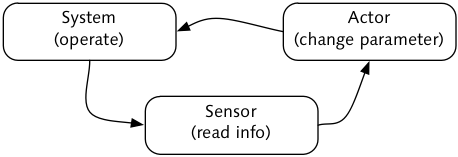
Let’s look at aspects of feedback loops. There is an actor to change the system operation as well as a sensor that reads some information. In order to actually be a feedback loop, the sensor is driving the actor.

Note that most systems allow data to be read at any time and (essentially) any frequency. However systems usually also do not immediately respond to changed input. Here’s an example: You could read a thermometer in your room as often as you like. And you can also turn the control of the heater up or down pretty often and yet the room temperature will not change immediately.

Usually there is no point in acting a whole lot faster than the system can react. If it takes ½ an hour for the room temperature to adapt to a newly set value, reading the thermometer and changing the control every minute doesn’t make much sense.

Some waste and some risk

Now, with the focus on short time scales and a high frequency of the measurements (no matter wether they are qualitative or quantitative), I can imagine two undesirable outcomes:

  1. In a situation where the system reacts slowly to changing parameters, measuring often is waste. This is because the system couldn’t possibly yield another outcome (yet).
  2. If we only measure with a rather coarse-grained way (e.g. only the values red, yellow, green), we might miss a slow trend. (I guess this is the reason we often suddenly must buy winter tires, even though we clearly noticed that the temperatures decreased over the past weeks and we’re wearing our long sleeved shirts and anoraks too.)

That said, if the system reacts fast on a change and we can get the feedback quickly, it’s very likely a good idea to actually get that feedback. A good example for this case: Having fast unit tests in programming. 🙂

A Surprising Use of an Interface

This post relates to my short talk at the Agile Testing Days in Potsdam, Germany 2012.

Earlier this year I tweeted this (there’s another blog post about this as well):

Automating tests/checks, seems more valuable than having automated tests—like planning being more valuable than having the plan.

In my case the automating certainly led to other interesting results — and that’s the topic of this post.

Some context

Let’s assume we’re using Cucumber to automate tests for some application and follow the typical Cucumber setup: A folder features containing the feature files and inside of that another folder (step_definitions) containing, well, the step definitions. A support folder inside the feature directory keeps supporting files, such as environment configuration(s) etc.

Keeping it clean

The way I started to work is to start simple: At first I put everything inside the step definitions. Pretty soon though, I extract code chunks into methods of their own. And then move those method definitions into their own class (or module) – an in fact a file of their own.

That way, I end up with two more levels of abstraction below the feature descriptions and the step definitions: Classes (or modules) containing method definitions (see picture).

feature files, step defs, classes/modules, methods

Here I follow Uncle Bob Martin‘s advice of “Extract till you drop” (see his book ‘Clean Code‘, and episode 3 (Functions) of the video series at cleancoders.com): Extract methods until there’s nothing left to extract (and extract that code into the right place).

A first result: A high level interface to the system

One of the results of doing this, is a really high level and clean API to the system at hand. In addition to that I find that step definitions are much easier to understand, since they (mostly) contain a business level description of how the system is used and accompanying assertions to check whether the system behaves as it should.

Enter Pry

Pry is a command line tool for Ruby, like the interactive ruby shell irb that comes with Ruby. However, Pry is a lot more powerful and offers to display method definitions (even those defined in the C sources of internal Ruby classes) and a whole lot more. For a good introduction see the Pry Screencast by Josh Cheek on vimeo.

A trivial and contrived example

Let’s assume we’re trying to find stuff on the web (I’m on a Mac; there are hints about how to achieve this on Windows in the code comments):

require 'safariwatir' # Windows: require 'watir'

class GoogleSearch
 def initialize
 @browser = Watir::Safari.new # Win: Watir::Browser.new
 end

 def search_for search_term
 @browser.goto 'http://wellknown-search-engine.example.com/'
 @browser.text_field( :name, 'q' ).set search_term
 @browser.button( :id, 'gbqfb' ).click
 @browser.ol( :id, 'rso' ).links.map(&:text)
 end
end

Given that interface and Ppy, the creation of a console app borders on being trivial (yet, it took me a long while to get to this point):

require_relative 'google_search'
require 'pry'

GoogleSearch.new.pry

Think about this for a moment: Take Pry and your API and in 3 lines of code you get a console app for your system. The console can be used like this:

[10] stephan@nibur … #ruby google_search_console.rb
[1] pry(#<GoogleSearch>):1> search_for 'pry video josh'
=> ['Pry Screencast on Vimeo',
# ...

As mentioned above, you can even display the method definition (including lines of code, file name etc.)

[8] pry(<GoogleSearch>)> show-method search_for

From: /Users/stephan/…/google_search.rb @ line 8:
Number of lines: 6
Owner: GoogleSearch
Visibility: public

def search_for search_term
 @browser.goto 'http://google.de/'
 @browser.text_field( :name, 'q' ).set search_term
 @browser.button( :id, 'gbqfb' ).click
 @browser.ol( :id, 'rso' ).links.map(&:text)
end
[9] pry(#<GoogleSearch>)>…

Leaving thoughts

It seems that doing something can be more valuable that having the result. Notwithstanding, we still need to produce something of value for our business.

I came to realise that clean code matters more than ‘only’ providing a code base that’s easy to understand and change: Without the high level API, I might not even have noticed the possibility to create a ‘business level console’.

Having a console app like this allows to prepare starting points for exploratory testing (that might be ‘automation assisted exploring). Or short: I think a clean and high-level interface plus Pry is a cool tool for exploration.