Checking Text with Vale

I’m currently reading Brian P. Hogan‘s book ‘Write Better with Vale‘, about Vale (a command line tool to ease follwing style guides in prose text).
While intended for prose text (as far as I know), Vale can also process any text file, including code.

When I tried to copy & paste commands from the epub version of the book, into my shell, I got an error message:

> vale .
E100 [NewE201] Runtime error
The path ‘…/vale_example_project/​../styles​​’ does not exist.
Execution stopped with code 1.

After some exploration, I figured that some zero-width-space characters were in the INI file I copied into my example project (and reported it over at the books feedback site).

Then I realised that I could create my own Vale rule to detect these invisible characters in text files.

Now, Vale is configured using an INI file. There you declare where it can find the styles and which rules should be applied for which files (see https://vale.sh/docs/vale-ini for more details).
I set up a new rule in a file …/styles/Custom/NoZeroWidthSpaces.yml:

# Styles/Custom/NoZeroWidthSpace.yml
extends: existence
message: "Avoid using zero-width or invisible characters (%s)."
level: error
scope: raw
raw:
  - '[\u200B\u200C\u200D\u2060\uFEFF]'

I set up Vale to use this new Custom rule in .vale.ini like this:

StylesPath = styles

[*.md]
BasedOnStyles = Custom

With that, I get a nice message when running vale against a file riddled with those characters::

> vale .

 example.md
 1:111  error  Avoid using zero-width or       Custom.NoZeroWidthSpaces
               invisible characters (​).

Admittedly, the empty looking parentheses aren’t very instructive, since they contain invisible characters. At least it’s possible to copy-&-paste them to find out what they are in other tools.

Getting Ready for ‘Advent of Code 2025’ – Review of the Past Years

A Christmas tree showed up at the 'right' iteration of an Advent of Code puzzle.

In preparation for this year’s Advent of Code, I’m looking back on the past years, collecting a few statistics.

  • From 2015 to 2024, I collected 153 stars
  • The lowest was 2016, with one star
  • In 2020, I collected the highest number of stars: 31
  • The solutions are spread over…
    • 170 Ruby files
    • 3 GraphVis files
      Yes, I did solve some of the puzzles using GraphViz & a printer. 😃

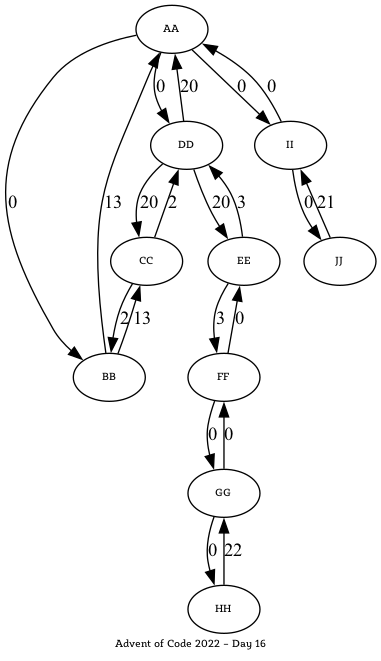
In some cases, I chose Graphviz to visualise the situation and support finding a solution to the puzzle at hand.
Here’s an image for an example data set for one day in 2022:

A graph representation of an 'Advent of Code' puzzle from 2022

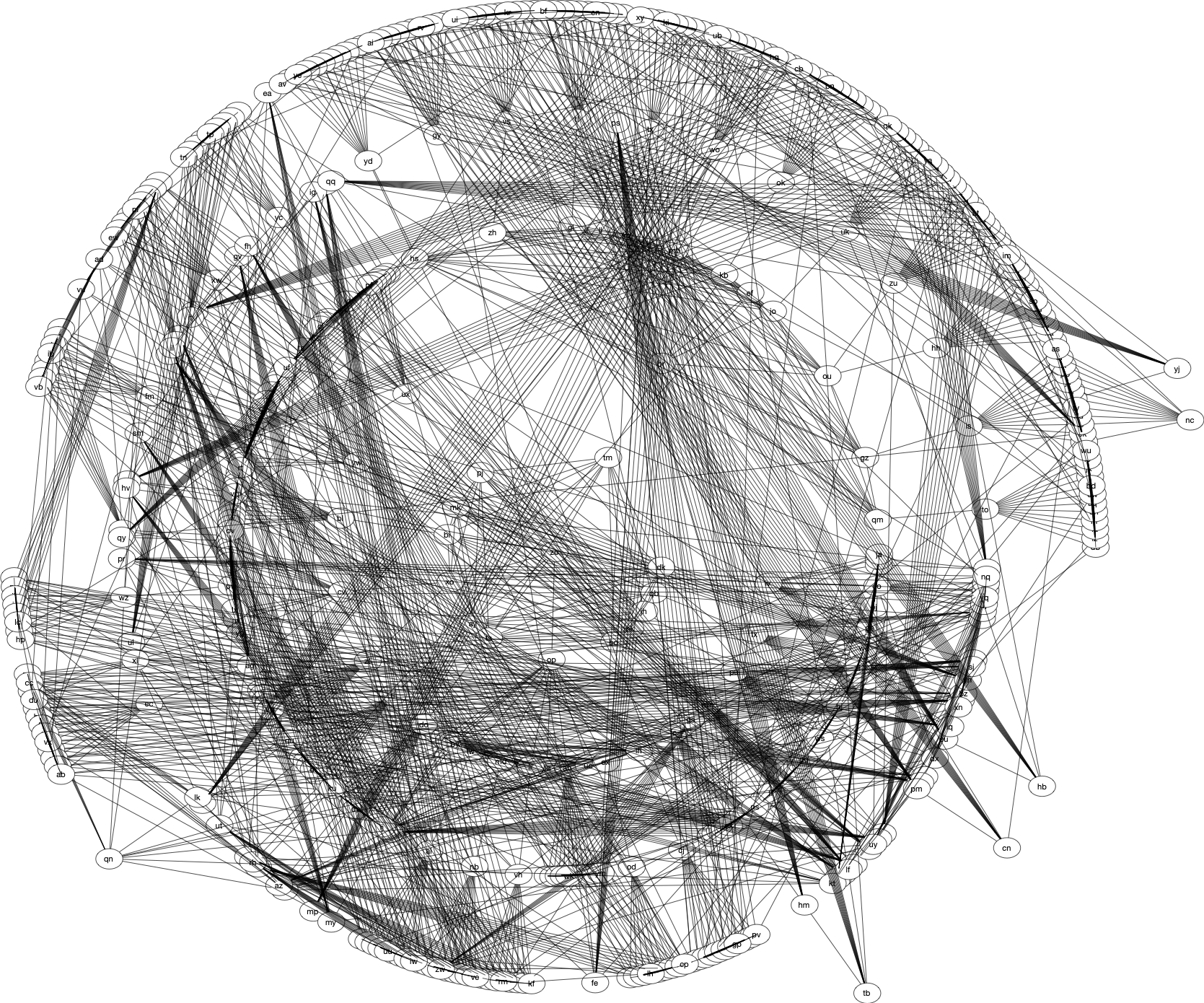
The full view of a complete input data set ()from another year was a bit more complicated:

Graph visualization of a complex dataset with numerous interconnected nodes and lines.

One puzzle was about finding a Christmas tree, and this is how ‘mine’ looked like:

A Christmas tree showed up at the 'right' iteration of an Advent of Code puzzle.

I’m already looking forward to another ‘Advent of Code’!

Tiny Contributions to Open Source

Here’s my tip to start contributing to Open Source: Dare to make even tiny improvements. Probably smaller than that.

This one for #Rails fixes the formatting of a link in Markdown: https://github.com/rails/rails/pull/44044/. It’s small:

-dialog, the request is aborted. Both of these options are powered by (Turbo)[https://turbo.hotwired.dev/]
+dialog, the request is aborted. Both of these options are powered by [Turbo](https://turbo.hotwired.dev/)

Here’s another, even smaller one: https://github.com/rubygems/rubygems-mirror/pull/82

-    - from: http://rubygems.org
+    - from: https://rubygems.org

Both contributions were in the documentation, rather than the project’s code.

I find it easier to contribute to documentation rather than code. I don’t need to worry about setting up a working test environment for the whole project.
Generating the documentation on my machine and then checking the resulting HTML usually suffices.

In any case, don’t worry that a change is too small to be accepted

I will admit that one aspect of very small contributions is overhead. In most open-source projects, contributions follow several steps:

  1. Fork the project (i.e. create your own Git repository with the projects code).
  2. Create a branch in your fork, and make the change in that branch.
  3. Create a ‘Pull Request‘ (sometimes also called a ‘Merge Request‘) summarising the change.
    Participate in the discussion (if there is any) and incorporate further changes as needed.
  4. Get the pull/merge request accepted & merged into the projects main branch.

I recommend one more step after 4: Celebrate 🎉 at least a little bit.

For detailed information about contributing to open-source projects, I recommend the Open Source Guides.

How to Rename Your MacBook

A zsh showing the login time, user name and host name

This is another blog entry in the #ReminderToSelf category.

I got a new MacBook an wanted to change its hast name since I find “Stephan’s Mac” not terribly inspiring.

Since joining the Oceanography department at the University of Bremen (years, nearly two decades ago), I find ocean names are the way to go. — Even more so since I started open water swimming not that long ago.

Here’s what I tried first:

  1. Set the name in the Mac’s system setting under “General” ➙ About:
    The Mac's system setting showing the name of the computer
  2. Set it in the “Sharing” part as well:
    
The Mac's 'Sharing' option to sewt the computer's network name

Interestingly, that didn’t seem to be enough, the command line prompt still showed the computer’s default name.

However, there’s a command line tool that allows setting these kinds of information `scutil’:

> scutil --get HostName
atlantic
> scutil --get ComputerName
atlantic
> scutil --get HostName
atlantic

This command can also set these names by using --set instead of --get.

Author and Committer Dates in Git – An Obscure Bug

Output of the command 'cal -A 1 1970' (on macOS), showing a calendar for Dec 1969 and Jan 1970

The Context

While preparing a Git repository for my tutorial “The Disappearance of J. T. Womblegast — A Git Tutorial” for the Agile Testing Days 2024, I wanted to set the commit and author date for commits explicitly.

In most cases, these dates are identical. Still, they can be different, as the author and committer can be different people (for details about the commit details, see the extensive Git documentation for commits). One interesting detail about the dates: The author date can be set with the command line option --date , while the committer date can only be set using an environment variable.

How to set the dates

I chose to set the author date using the command line option and the environment variable GIT_COMMITTER_DATE for the committer date.

When there is a change in the Git index (or staging area), here’s how to commit it with the given date and time info:

> GIT_COMMITTER_DATE="Sun Aug 4 11:14:08 2024 +0200" git commit -m "Demo commit" --date "Wed Jul 24 19:09:11 2024 +0200"
[main (root-commit) cbaea5e] Demo commit
 Date: Wed Jul 24 19:09:11 2024 +0200
 1 file changed, 1 insertion(+)
 create mode 100644 wahoodie

All is good: I created a file with some content, added it to the staging area, and committed it.

Varying the dates

Let’s be more daring with the commit dates and go a few years into the future and past. Add some more text to the file ‘wahoodie’ I used before, add the change to the Git index and commit:

> echo "more text" >> wahoodie
> git add .
> GIT_COMMITTER_DATE="Sat Jan 1 00:00:00 2000 +0200" git commit -m "Another commit" --date "Tue Jan 19 2038 03:14:08 UTC"
[main 133c21b] Demo commit
 Date: Tue Jan 19 03:14:08 2038 +0000
 1 file changed, 1 insertion(+)

It still looks good.

When it’s not working

Now, let’s go far into the past (and future):

> echo "another line" >> wahoodie
> git add .
> GIT_COMMITTER_DATE="Wed 11 Oct 1634 22:47:38 +0000" git commit -m "Updates file" --date "Tue Jan 19 2038 03:14:08 UTC"
fatal: invalid date format: Wed 11 Oct 1634 22:47:38 +0000

Huh? Is something wrong with the (committer) date? It looks OK, but it could be the weekday that’s causing trouble. Let’s try to commit a change using the wrong weekdays:

> echo "even more text" >> wahoodie
> git add .
> GIT_COMMITTER_DATE="Mon Aug 4 11:14:08 2024 +0200" git commit -m "Demo commit" --date "Sun Jul 24 19:09:11 2024 +0200"
[main e2e848e] Demo commit
 Date: Wed Jul 24 19:09:11 2024 +0200
 1 file changed, 1 insertion(+)
stephan@seaside ~/dev/garble-git-repo/tmp/wahoodie ᚠ main > git log --format="Author Date:    %ad %nCommitter Date: %cd     %h" -1
Author Date:    Wed Jul 24 19:09:11 2024 +0200
Committer Date: Sun Aug 4 11:14:08 2024 +0200     e2e848e

The given date is used, and the offered weekday was corrected. Things look OK when leaving out the weekday altogether:

> echo "one more line" >> wahoodie
> git add .
> GIT_COMMITTER_DATE="Aug 4 11:14:08 1987 +0200" git commit -m "further update" --date "Jul 24 2042 19:09:11 +0200"
[main 696dc2b] further update
 Date: Thu Jul 24 19:09:11 2042 +0200
 1 file changed, 1 insertion(+)
> git log --format="Author Date:    %ad %nCommitter Date: %cd     %h" -1
Author Date:    Thu Jul 24 19:09:11 2042 +0200
Committer Date: Tue Aug 4 11:14:08 1987 +0200     696dc2b

The real cause of the error message

After experimenting with the date & talking to folks on the Git Discord, I figured the epoch is the (lower) boundary for dates in Git. Let’s use the following shell script (‘demo-date-format-issue.sh’):

git init tmp
cd tmp
echo "Some content" > non-empty-file.txt
git add .
GIT_COMMITTER_DATE="31 Dec 1969 23:59:60 +0000" git commit -m "Commit 1" --date "12 Dec 1969 23:59:60 +0000"
GIT_COMMITTER_DATE="01 Jan 1970 00:00:00 +0000" git commit -m "Commit 1" --date "01 Jan 1970 00:00:00 +0000"

Running it gives the following output:

> ./demo-date-format-issue.sh
Initialized empty Git repository in /Users/stephan/dev/garble-git-repo/tmp/.git/
fatal: invalid date format: 31 Dec 1969 23:59:60 +0000
[main (root-commit) 9c0b65a] Commit 1
 Date: Thu Jan 1 00:00:00 1970 +0000
 1 file changed, 1 insertion(+)
 create mode 100644 non-empty-file.txt

Aha! The first commit attempt fails and gives a misleading error message: The date format is perfectly valid. Apparently, Git can’t process a date before 1 January 1970 00:00:00 UTC.

Remarkably, the next date that might cause trouble, ‘2038-01-19T03:14:08+00:00’, doesn’t. Instead, the last future date & time at which a commit is possible is ‘2099-12-31T23:59:59+00:00’, as the following example code shows:

echo "More content" > non-empty-file.txt
git add .
GIT_COMMITTER_DATE="01 Jan 2100 00:00:00 +0000" git commit -m "Commit 2" --date "01 Jan 2100 00:00:00 +0000"
GIT_COMMITTER_DATE="31 Dec 2099 23:59:60 +0000" git commit -m "Commit 2" --date "31 Dec 2099 23:59:60 +0000"

The output of this is:

fatal: invalid date format: 01 Jan 2100 00:00:00 +0000

I don’t understand why the year change from 2099 to 2100 is the upper boundary for the dates Git will process. To me, this seems a bit limiting since it’s ‘just’ ≈75½ years until then. (If you know why this limit has been chosen, please share.)

In any case, printing an error message that claims a date format is invalid when it’s not is a bug. I said ‘obscure bug’ in the title. 😃

I reported the issue in the Git mailing list, but am not sure about how thigs develop from here. Someone proposed a better error message and I very much appreciate it.

Agile Testing Days 2024 – Planned Sessions

At Agile Testing Days 2024, I offer a full-full day tutorial, ‘The Disappearance of J. T. Womblegast — A Git Tutorial‘ (on 19. Nov.). As the name suggests, the tutorial is about working with Git. But it’s also a mystery journey about the disappearance of some J.T. Womblegast who strangely left nothing but a Git repository containing hints about this … retreat.

Additionally, I’m available for a 45-minute team coaching slot; see https://agiletestingdays.com/groups/team-coaching/ for details. Possible topics are:

  • Behaviour Driven Testing
  • Pair programming
  • Test Techniques
  • Test first
  • Test automation
  • Considering Ruby for test automation

Of course, other topics are possible. If you’d like to take this opportunity and have any questions or suggestions, talk to the conference organisers (or me directly).

It’s complete ‘Software People … Work From Home’

The community-written book ‘Software People … Work From Home — Insights & Experiences From Planet Earth‘ is now complete. It contains contributions from 34 people and 28 countries (in alphabetical order):

  • Argentina
  • Australia
  • Canada
  • Denmark
  • Dubai
  • Finland
  • France
  • Germany
  • Greece
  • India
  • Italy
  • Lithuania
  • Luxemburg
  • Malaysia
  • Netherlands
  • New Zealand
  • Norway
  • Portugal
  • Russia
  • Scotland
  • Singapore
  • South Africa
  • Spain
  • Sweden
  • Tunisia
  • Turkey
  • USA
  • Wales

I thoroughly enjoyed ‘managing’ this writing project: Talking to so many people from so many countries, figuring out a good way to generate preview PDF files automatically and getting the feedback and contributions from so many people, was just that: Enjoyable. Thanks everyone who was involved and everoy who got the book already.

You can get it too: It’s avaiable at LeanPub for free at https://leanpub.com/softwarepeopleworkfromhome

Enjoy!